Shared Clipboard
Free and open source · No account · Works offline

Copy on one machine. Paste on another.

An encrypted clipboard and chat shared between the devices on your own network. Nothing touches the internet, nothing touches a server, and you can read every line of how it works.

Windows · macOS · Ubuntu — no internet connection required

An MVP built by Vijaya Pardhu

Download

Install it on both machines

That is the only setup step. Both copies find each other on the network by themselves.

Windows will say “Unknown publisher”. That is expected.

Windows reads the publisher name out of a code-signing certificate, and this project does not have one yet — so the field is blank. It is not a claim that anything is wrong with the file. Once downloaded, right-click it and choose Properties → Details: it says Vijaya Pardhu.

To run it: More info → Run anyway on Windows, right-click → Open on macOS, chmod +x on Ubuntu. Or build it from source and trust a binary you compiled yourself — which is rather the point of it being readable.

Free forever, MIT licensed. All releases and changelogs →

The problem

You have emailed yourself a link. Everyone has.

You are on one machine and you need something from another. So you message it to yourself, or type out a forty-character URL by hand and get one character wrong. Every workaround sends your clipboard to a server that has no business seeing it.

Messaging it to yourself

  • Your clipboard goes to someone else's server
  • Needs an internet connection
  • Log in, compose, send, open, copy — every single time
  • Screenshots and files are even more painful

Shared Clipboard

  • Stays on your own network
  • Works on WiFi with no internet
  • Ctrl+C here, Ctrl+V there. That is the whole workflow
  • Text, images and files, with history you can search

How it works

Four steps, then you forget it is there

Follow along — each step draws what is actually happening between your two machines.

Your laptop Room: “Project” Your password scrypt Encryption key Join code K7QM2X public

The password never leaves your machine. It is stretched into an encryption key locally. The join code is public — it is only useful to someone who also knows the password.

Your laptop K7QM2X or a QR code K7QM2X The other machine code password

You pass on the code however you like — read it out, or let them scan the QR. The password is shared separately, and never appears in the QR code.

The other machine proves it knows the password request + proof Your laptop “Meghana-Air wants to join.” Approve wrong password or wrong code Rejected before anything is shared

The request carries a proof, not the password. Only a device holding the right key can produce something you are able to open — and a private room still needs your explicit approval.

Your laptop Ctrl + C “meeting at 4pm” sealed The other machine Ctrl + V “meeting at 4pm” Someone else on the WiFi 8f2a91c0e7… receives it, cannot read it

Everything is sealed before it leaves. Other devices on the same WiFi receive the same packets and see nothing but ciphertext — no password, no key, no content.

Under the hood

What happens in the second after you press Ctrl+C

Seven stages, all on your own machine and your own network. The two highlighted ones are where the privacy comes from.

You copy Text, an image, or a file
Noticed Checked once a second
Sealed AES-256-GCM, with your room key
Split up Only if it is too big for one packet
Your WiFi Straight to the other device
Checked Is the sender really in this room?
Ready to paste Ctrl+V on the other machine
Where your privacy is enforced Ordinary plumbing

No step in that chain is a server. There is nothing to sign up for and nothing to take offline.

Who it is for

Anyone with more than one screen

Students

Your laptop and the lab machine, working on the same thing. Move error messages, documentation links and code between them without emailing yourself.

Working in a group? One room turns everyone's clipboard into a shared scratchpad for the afternoon. Close the room when you are done and it is gone.
Office and remote teams

Pair programming, shared debugging, moving a config value onto a test machine. A password-protected room stays private even though the whole floor is on the same WiFi.

For credentials, internal URLs or customer data, the fact that nothing reaches a third-party server is the entire point.

Two machines, one desk

Desktop and laptop. Work machine and personal machine. A Windows box and an Ubuntu box side by side. One room and your clipboard simply follows you between them.

Classrooms and workshops

Put a command into an open room and everyone in the room has it instantly — instead of reading it out character by character while everybody mistypes it.

Security

"Encrypted" gets claimed a lot

So here is exactly what happens, and exactly what it does not cover. Everything security-related uses the standard library — there is no cryptography dependency to audit or trust.

1
The password is never sent It only ever feeds the key derivation, locally. To join, your device seals a known phrase with the derived key and sends that. Only someone who knows the password could produce something the owner can open.
2
Four checks before anything is applied A packet is acted on only when the room exists here, you are an accepted member, the sender is an accepted member, and the payload actually decrypts. Anything else is dropped.
3
Tampering is detected, not just decryption failure The authentication tag means a modified packet is rejected outright instead of quietly producing garbage.
4
Proofs cannot be replayed Each proof is bound to its own room, so one captured from elsewhere is useless.
5
Removal is immediate The room owner is the single source of truth for who is in it. Remove someone and every device updates — they cannot read anything sent afterwards.

And what it does not protect against

Overclaiming is worse than a smaller claim, so these are written down plainly rather than buried:

  • Room names and owner names are public — devices have to be able to find rooms. Member lists, join codes and content are not.
  • Someone watching the network can tell that a room is busy and roughly how large its messages are.
  • Keys are cached on your disk so you do not retype the password every launch. Anyone with access to your user account can read them.
  • An open room with no password is plain text. That is what it means, and the app labels it "Not encrypted".
  • Physical or administrator access to a machine defeats all of it.

The full model is in SECURITY.md. If you can break one of the five claims above, please report it.

The app

Light or dark, and out of your way

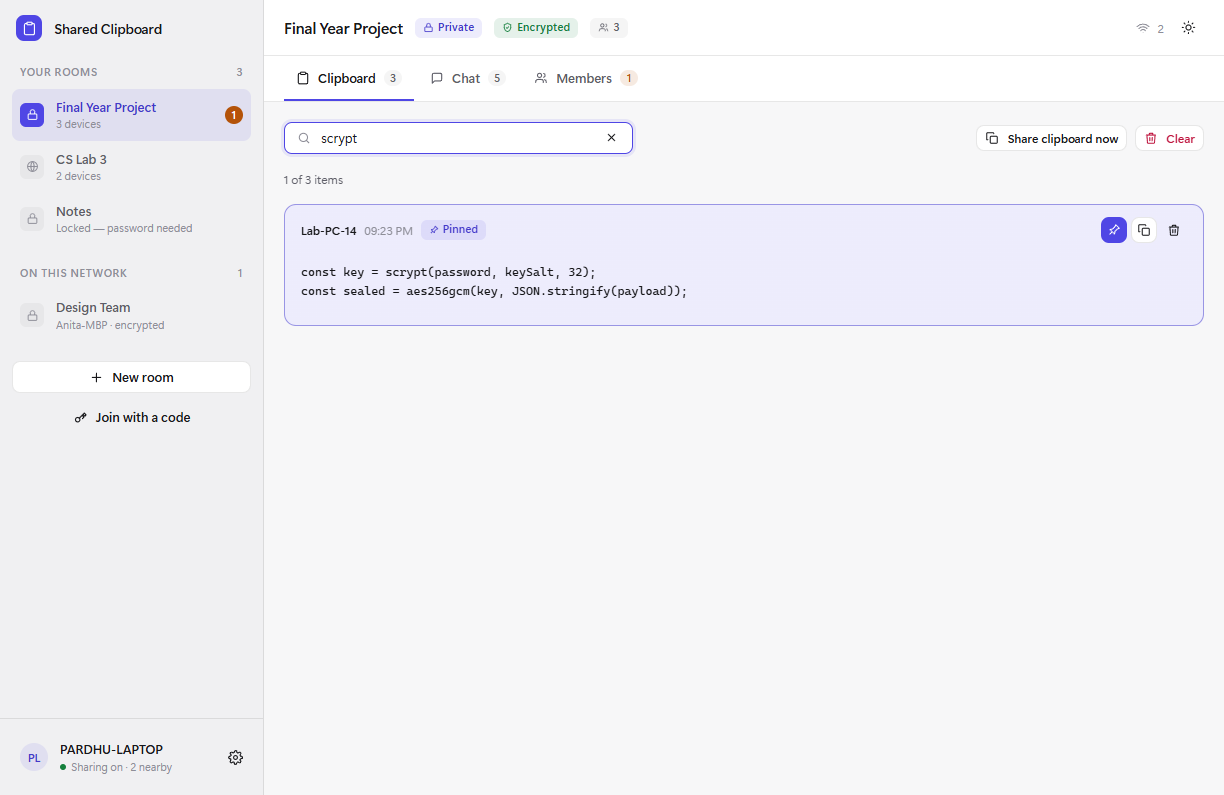
Clipboard history for a room, with search and a pinned item
History you can search, with items you can pin
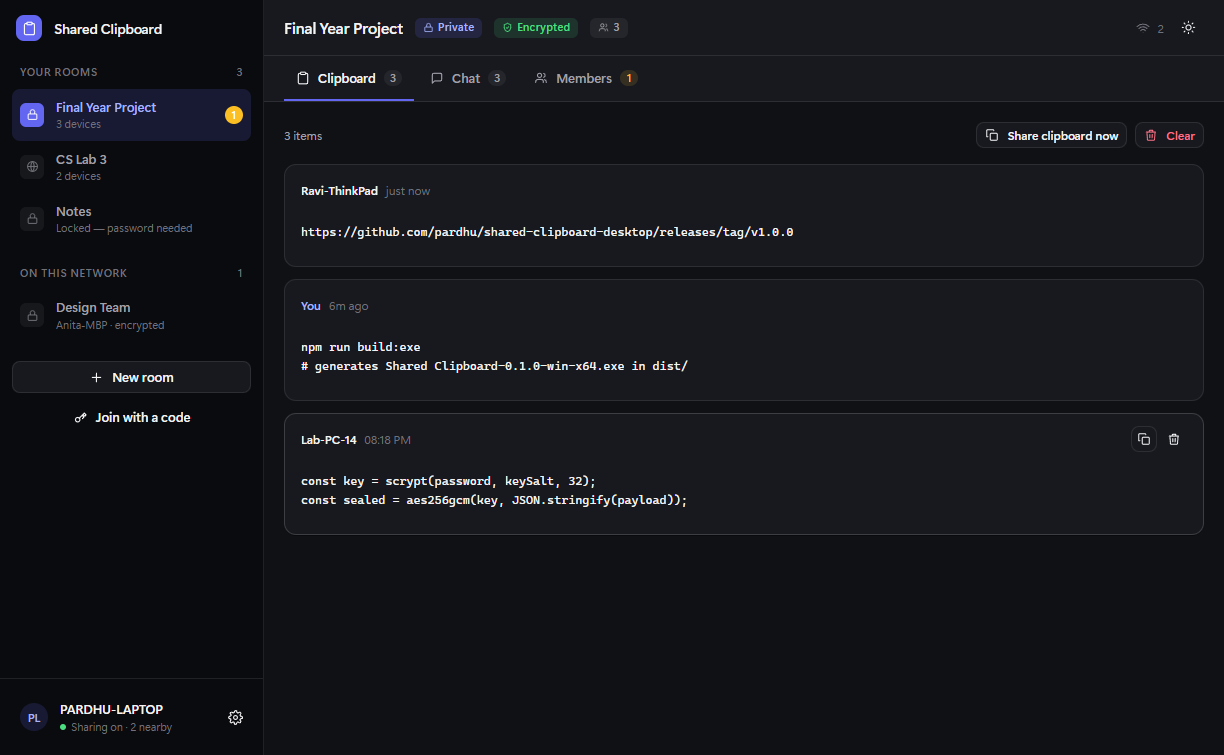
The same clipboard history in dark mode
The same view in dark mode
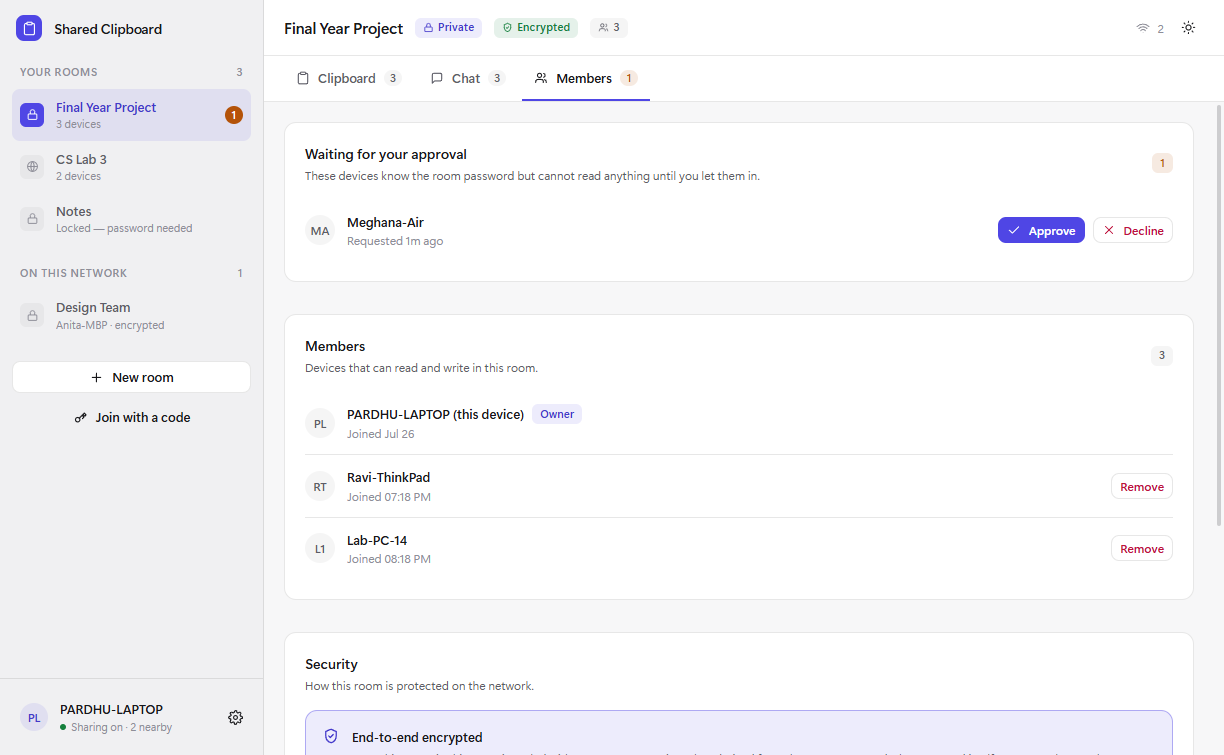
Members panel showing a pending approval request
Approvals, members and per-room security
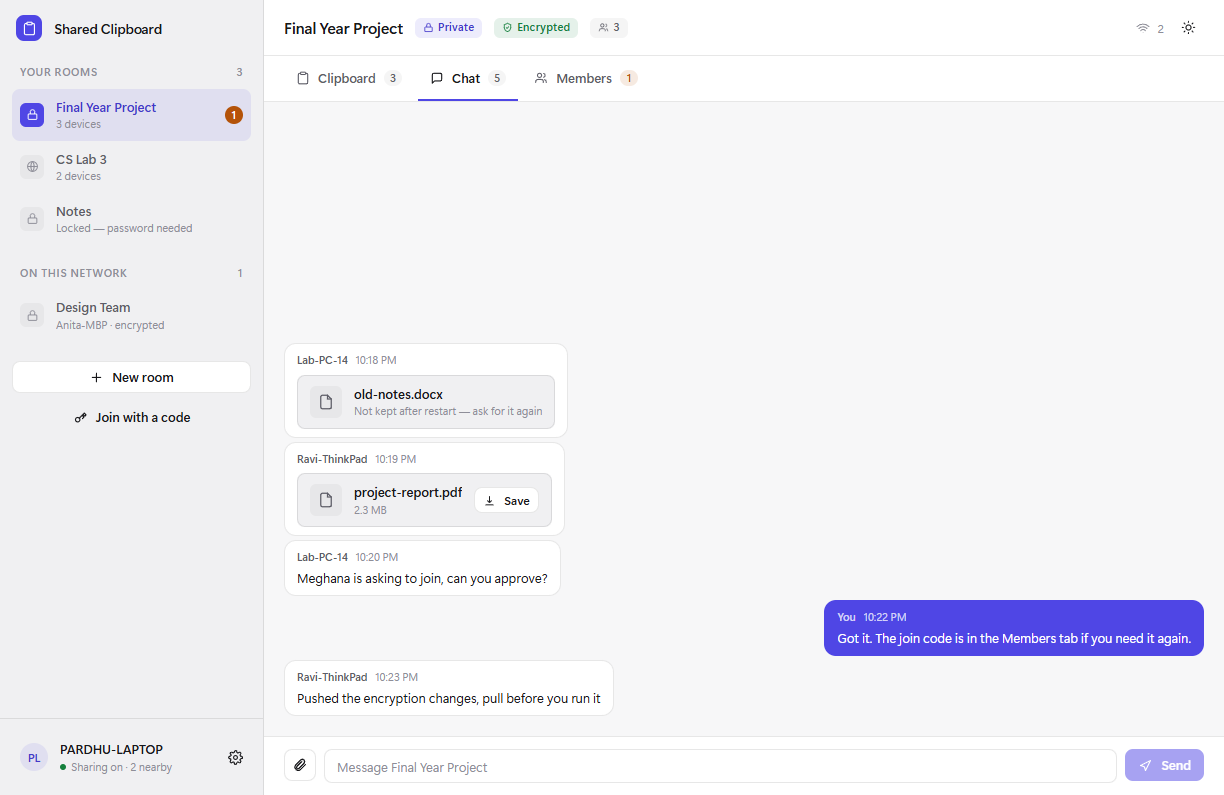
Chat showing a shared PDF with a save button
Chat with file transfer, encrypted with the room
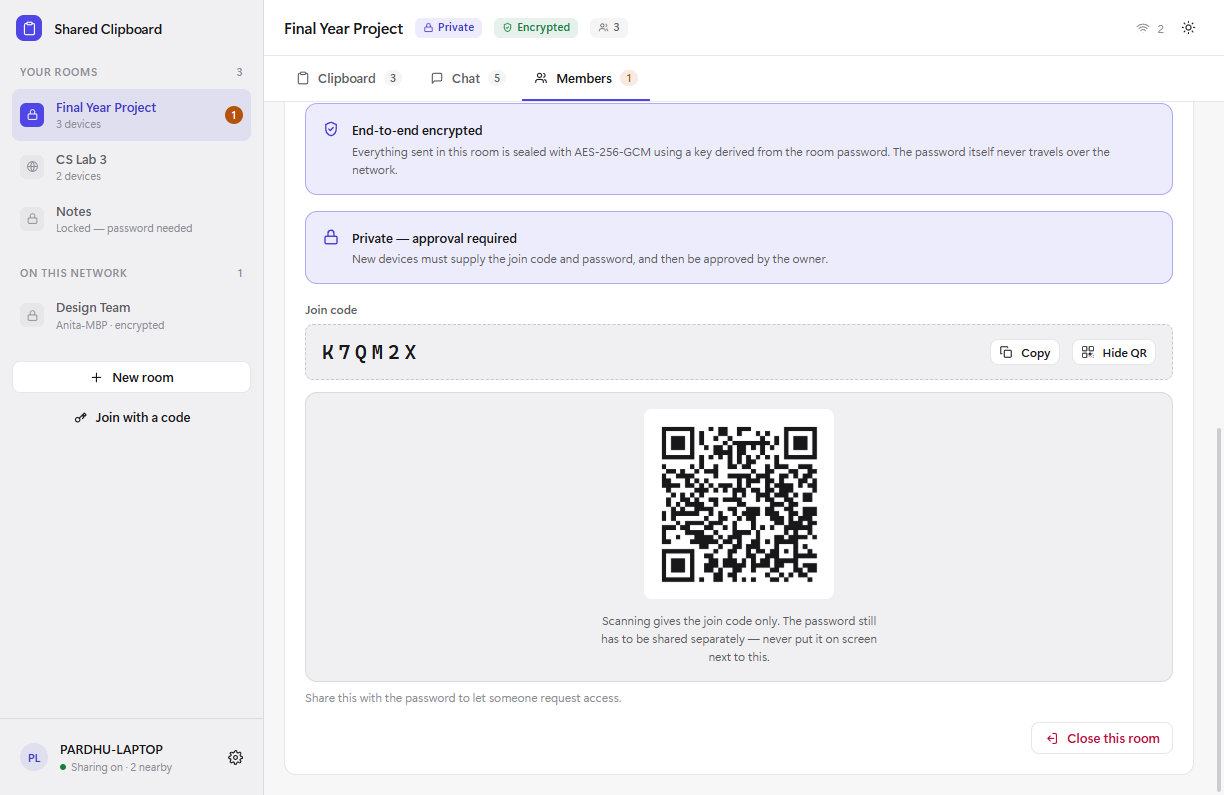
A QR code for a room's join code
Scannable join codes — never the password
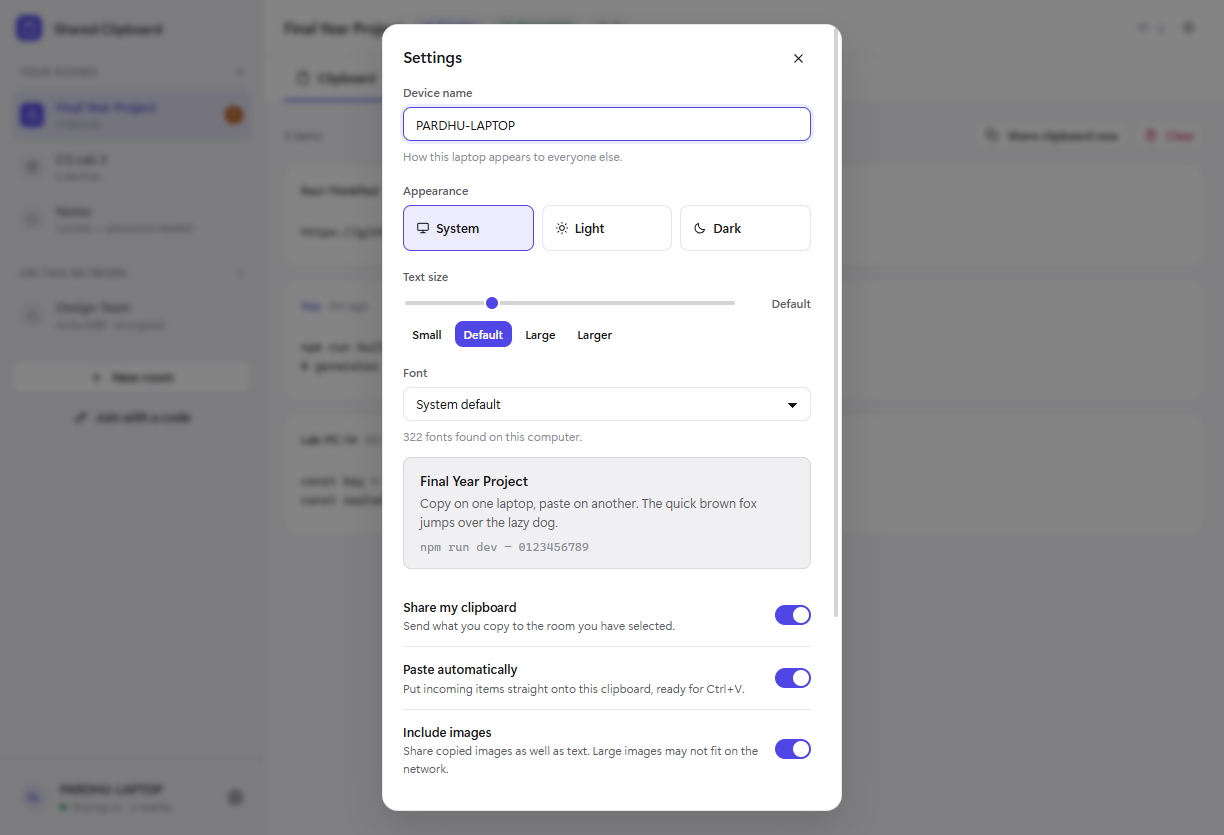
Settings with theme, text size and font options
Theme, text size and a system font picker

Built with

Boring, readable technology

Every choice here was made so that someone can clone the repository and understand the whole thing. No message broker, no backend, and no cryptography dependency.

Electron 35One codebase, three desktop platforms, real clipboard access
TypeScript 5.8Strict mode — a network protocol is easy to get wrong
React 19The whole interface is state-driven
Vite 6Fast dev server, small production build
Node dgramUDP on the LAN. No server, no broker
Node cryptoscrypt and AES-256-GCM from the standard library

Run it yourself

From source in a minute

Node.js 20 or newer is the only prerequisite.

git clone https://github.com/Vijayapardhu/Clipboard.git
cd Clipboard && npm install
npm run dev

npm test runs 56 assertions covering key derivation, tampered packets, forged proofs, chunk reassembly and the membership rules — in plain Node, with no framework.

Roadmap

Shipped, and what is next

  • Chunked transfer so large screenshots sync Shipped
  • File transfer in chat Shipped
  • QR codes for join codes Shipped
  • Pinned clipboard items Shipped
  • Search across clipboard history Shipped
  • Keyboard shortcuts Shipped
  • Translations Open
  • A mobile companion app Open
  • Working on networks that block UDP broadcast Open

The three that are left are the interesting ones — each has an issue explaining where to start and what "done" looks like.

Vijaya Pardhu

MVP designed and built by

Vijaya Pardhu

The protocol, the cryptography, the interface and the documentation — all of it. Shared Clipboard exists because moving something between two machines you already own should not require a round trip through somebody else's server.

It is open source so anyone can check that claim for themselves, and so anyone who wants to make it better can.

Collaborators wanted

This project is looking for people

It works, it is documented, and there is a lot of obvious room to grow — which is a good place to join. You do not need to be an expert. If you know some TypeScript, or React, or you just want to fix a wording mistake, there is something here for you.

macOS & LinuxDevelopment has been on Windows. Real testing elsewhere would be genuinely valuable.
Security reviewThe model is written down. Try to break it — that is the most useful thing you can do here.
Design & accessibilityScreen reader support, keyboard navigation, colour contrast.
TranslationsEvery user-facing string lives in two files.
MobileThe protocol is documented. An Android or iOS client is wide open.
DocumentationTutorials, videos, or just fixing whatever confused you first.